
I wanted to do a park activation after a workday and since I work in Maryland, I needed to become familiar with some of the parks near my work. One such park is Seneca Creek State Park within a relatively short drive of the office. So, I packed up my radio kits and took them to work with me. Afterward, I headed off toward the park.
Seneca Creek State Park near Gaithersburg, Maryland is a relatively large state park, or at least it felt that way to me compared to some of the parks we have in Northern Virginia. While I was there for a singular purpose, I did drive around the entire park checking out the multitude of picnic areas to find the best one for a park activation. I noticed lots of wooded trails criss crossing the park road as I drove along. There are a handful or more of large picnic areas in the park, all of which are shaded with tall trees and consist of lots of spaced out picnic tables. The one I decided to use was Pines Picnic Area which is near the entrance of the park. At late afternoon, I had the picnic area to myself. I unloaded the radios and set them on the table. Midway through deploying the Wolf River Coils antenna, I started getting attacked by mosquitoes. Not to mention it was 90+ degrees and I was already starting to soak my t-shirt with all the sweat dripping off my body. It would have been nice to have some wind blowing through the area.
Mosquitoes or not, I was determined to get my activation accomplished. It had to be a quick one so I didn’t bother getting the microphone or paddles out and just did the regular FT8 activation, which is easy and quick to do with minimal effort. Maybe that’s why so many GOMs talk crap about it.
I learned a couple things during this outing that should make subsequent outings more fluid and quicker during the set-up stage. I’m still using HAMRS to generate the ADIF that I upload to the POTA web site. I’m also still logging automatically from WSJT-X to MacLoggerDX. I’m also trying to make sure that I am automatically uploading QSOs in real-time to both LoTW and QRZ. All of that worked well during my last POTA activation at Powhatan State Park, except for the real-time logging. I thought I got that sorted out for this activation and I did except for the LoTW uploads.
LoTW uploads must be signed using your LoTW certificate. So that I’m logging properly, I have a different station location configured in TSQL for each of the parks where I plan to operate. In order to use that location when I send my logs via MacLoggerDX, I have to include the location name in the MLDX configuration for LoTW. I had that set up correctly. What I forgot to do was to change the station location information in MLDX to match the location information set up in TSQL. So my home QTH information was being included in the logs in MLDX while the station location being used to sign and upload to LoTW had the actual operating location. Since these two did not match, real-time uploads were not possible and MLDX would give me an error message.
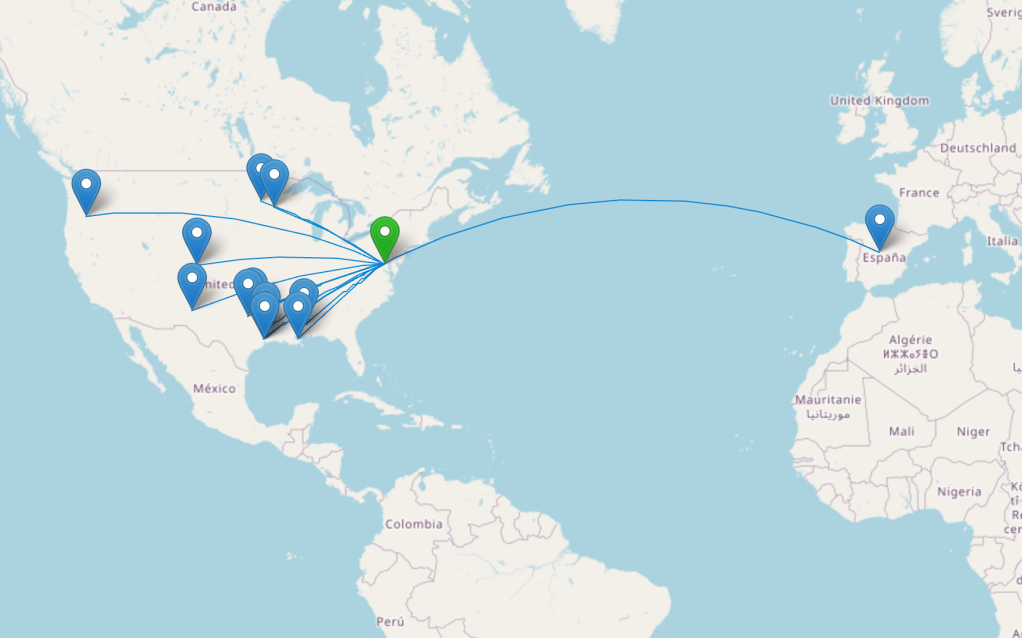
Given the situation, I was still logging everything as I wanted. QRZ was getting real-time QSO information and I was getting logs into my MacLoggerDX master log. I’d sort out the LoTW uploads later, which was easy enough to do once I looked at the MLDX debug log and found what was throwing the error. I fixed that, uploaded the QSOs to LoTW, exported the ADIF from HAMRS and uploaded that to the POTA site, and that was that. All in all, I got 13 contacts for a successful activation of US-1596.
Until next time, 73.
K2MAS
K2MAS.net is not affiliated with any of the sites or products listed in this article. All opinions are the author’s own.
As a member of Amazon’s Associate program, I earn a small commission on qualifying purchases made through referrals. This helps offset the costs of hosting this website and are greatly appreciated.
 K2MAS.net