I haven’t been messing around with my radio much for a long while if you can’t tell (my last blog post was from two years ago!). Recently, I found out that a cousin of mine is an amateur extra and has been for quite a few years. I reached out to him on QRZ and got his phone number and we got to chatting about radios. Turns out he does quite a bit of FT8, which I had only read about online and in QST articles over the last few years. I have to be honest, I got a little jealous.
As most hams will know, once we have an itch, it must be scratched and I was itching to get my feet wet with some digital mode operating on HF. I started hunting for what new hardware I’d need to make my Yaesu FT-891 transceiver able to work the digital modes. As it turns out, I had most of what I needed already and really only ended up buying a few things that make the process of getting on the air a bit easier with this radio.
Here is what ended up being the bill of materials for a digital-ready operating kit.
Bill Of Materials
- Yaesu FT-891
- Digirig DR-891
- Digirig short USB-C to USB-C cable
- MacBook Pro M2
- WSJT-X
- MacLoggerDX
- GridTracker2
- MFJ 1979 17′ stainless whip antenna
- Radial wire
- 25′ RG-8X coax
- LDG Z-11Pro II antenna tuner
- RigExpert AA-55 Zoom antenna analyzer
Like I said, some of the items in this list are not necessarily required items, but they do make operating a bit easier in their own separate ways.
I managed to get my whip antenna tuned to around 1.08 SWR near the FT8 calling frequency on the 10-meter ham band which I was surprised with to be honest. I had the whip set up on a small tripod (still considered ground-mounted in this case) and tossed on five short 6′-7′ strands of radial wire.
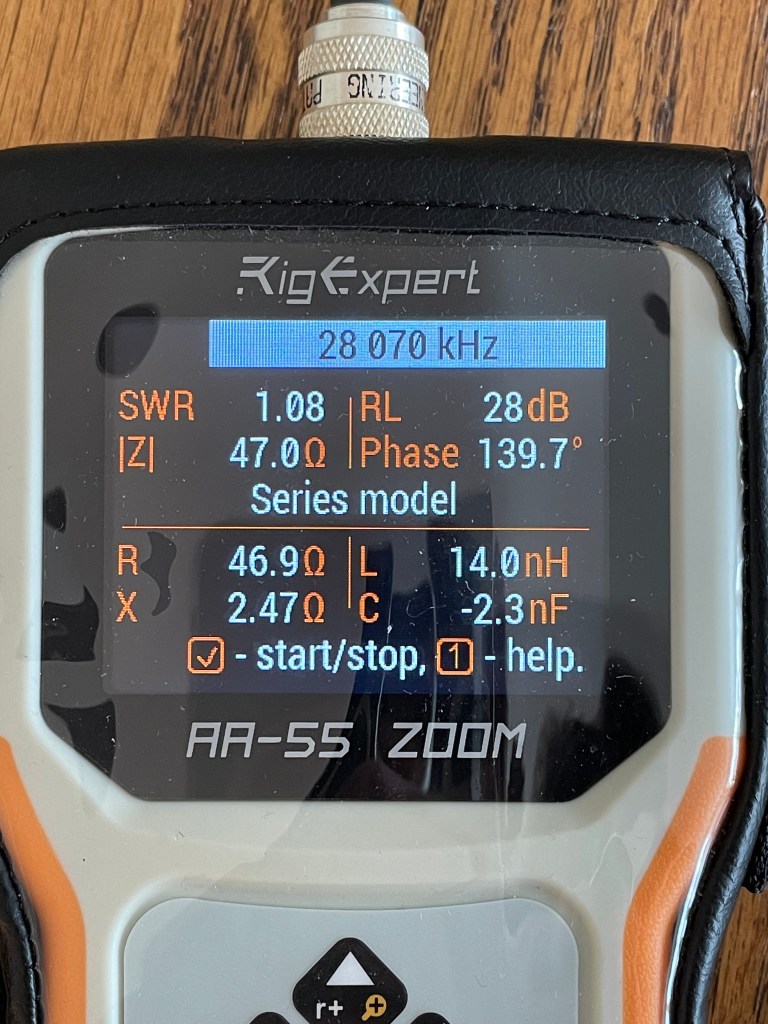
Satisfied with the antenna analysis, I started connecting everything up. I have the Yaesu FT-891 which is a very popular portable HF transceiver. I’ve had nothing but good times with this radio since I got it as a Christmas present a couple of years ago. I just need to use it more. The FT-891 does have a USB interface, which I understand to only allow CAT control of the rig from a connected computer. Connecting the radio to the computer is fine in some cases. For example, when I’m working SSB and using MacLoggerDX to log QSOs, having the CAT control is nice to pull in the frequency and other radio details that are present when logging the QSO. For digital mode operating, however, it’s useful to have an external sound card. While I understand that it is not a hard requirement, moving the sound function off of the computer and onto an external sound card is beneficial in preventing “system sounds” from creeping into your transmissions. “System sounds” meaning things like those annoying incoming message notification beeps and that like. With an external sound card, you can leave your system sounds for your system output device and your radio software can use the external sound card for its sound needs.
I initially considered buying the Tigertronics SignaLink as I’ve seen a plethora of reviews and setup guides for that device. After further review of what is required to get the SignaLink functioning with the FT-891, I decided to find a better, simpler solution. That solution ended up being the Digirig DR-891, which I believe was released last year (2024) and is designed to work specifically with the Yaesu FT-891 radio. Plug and play external sound card for the FT-891 that allows CAT control of the radio and PTT? Sounds great. You could also use the Digirig Mobile, but the connection to the radio is slightly different than with the DR-891.
The folks over at Digirig also sell a USB-C to USB-C cable in a couple of lengths, each of which have two inline chokes to help stave off any RFI risks. I have many USB-C to USB-C cables lying around, but none with chokes on them, so I bought a short cable from Digirig. This cable is used to connect the DR-891 to my MacBook.
Apart from all that, the only other thing I needed was to launch WSJT-X and set up my radio. I’ve decided I’ll save that for an upcoming blog post, so be on the lookout for it. After making sure CAT and PTT capabilities were working as expected in WSJT-X, I also launched MacLoggerDX in the background and configured it and WSJT-X to talk to one another. I use MacLoggerDX for all of my QSO logging as it’s maybe the nicest of the available options for Mac users and it’s regularly updated unlike much of the ham software for Macs that I’ve come across.
As I only have antenna space for 10 meters at the moment, that’s what I worked. I wasn’t sure how good my signal would be traveling, but with a bit of hope, I sent out a CQ and waited to see what happened. I was all smiles when I started receiving decent signal reports and multiple QSOs from folks coming up on the end of their day in the EU. I had successful QSOs with a few hams in countries such as Hungary, Netherlands, and Spain. I even got someone operating from the Canary Islands. It seemed like the band went a bit dead midday so I hung out and did some reading through the WSJT-X documentation to see if there were any software tweaks I could implement. In the afternoon, I hopped back online and made a few QSOs a bit closer to home. Earlier in the day, I made a lot more FT4 contacts than FT8 contacts, but in the afternoon, it was the opposite. Perhaps FT4 is more popular in the EU than it is in the US?
All in all, for the day, I logged 18 new QSOs, all of which were on 10 meters and all of them were either FT4 or FT8 digital. It was a lot of fun and for the first time operating a digital mode on HF, it was really exciting even though I know a lot of hams may consider the digital modes cheating. For someone in my operating situation, being able to still work distant stations with low power and weak signals helps to get me on the air when SSB wouldn’t and CW wouldn’t since I’m not proficient with CW. HF digital modes are a win for me.

I hope to learn how to use JS8Call and fldigi soon so that I can have some conversational QSOs via digital modes.
73 de K2MAS
As a member of Amazon’s Associate program, I earn a small commission on qualifying purchases made through referrals. This helps offset the costs of hosting this website and are greatly appreciated.
 K2MAS.net